Copy Assembly Inputs to Children
You can selectively copy the cost settings (including any user-defined attributes) from the top-level assembly to the children of that assembly. Use this Copy Assembly Inputs to Children command to pass down any changes in production inputs.
Note: When Annual Volume and Batch Size values are copied to children, they are multiplied by the child quantity. For example, if the assembly's annual volume is 10 and it has a child component that has a quantity of 5, then the child get an annual volume of 50.
- Open an assembly.
-
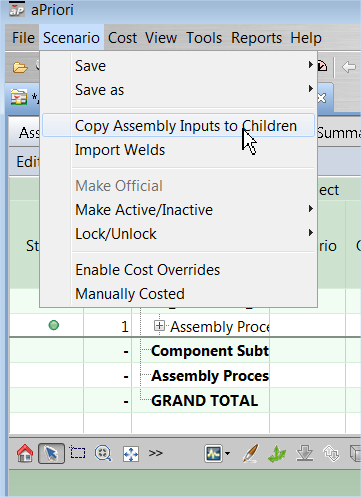
Select Scenario > Copy Assembly Inputs to Children:
-
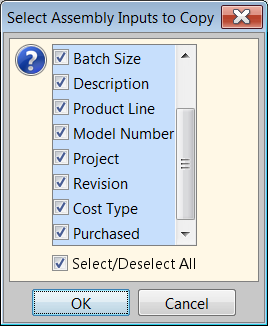
Use the checkboxes in the Select Assembly Inputs to Copy dialog to specify which values to copy. If you have user-defined attributes, use the scroll bar to view them at the bottom of the list. Click OK when done.
Caution: This only copies the inputs; the parts must need to be re-costed to see the impact of the changes.
Tip: See Copy Cost Settings for more information.